Smart Money Analysis
Liquidity, market structure (BOS/CHoCH) and the VAD cloud read institutional behaviour on the chart.
Professional Smart Money Trading System built primarily for Gold (XAU/USD), combining AI-powered trade analysis, institutional concepts, and a beginner-friendly workflow.
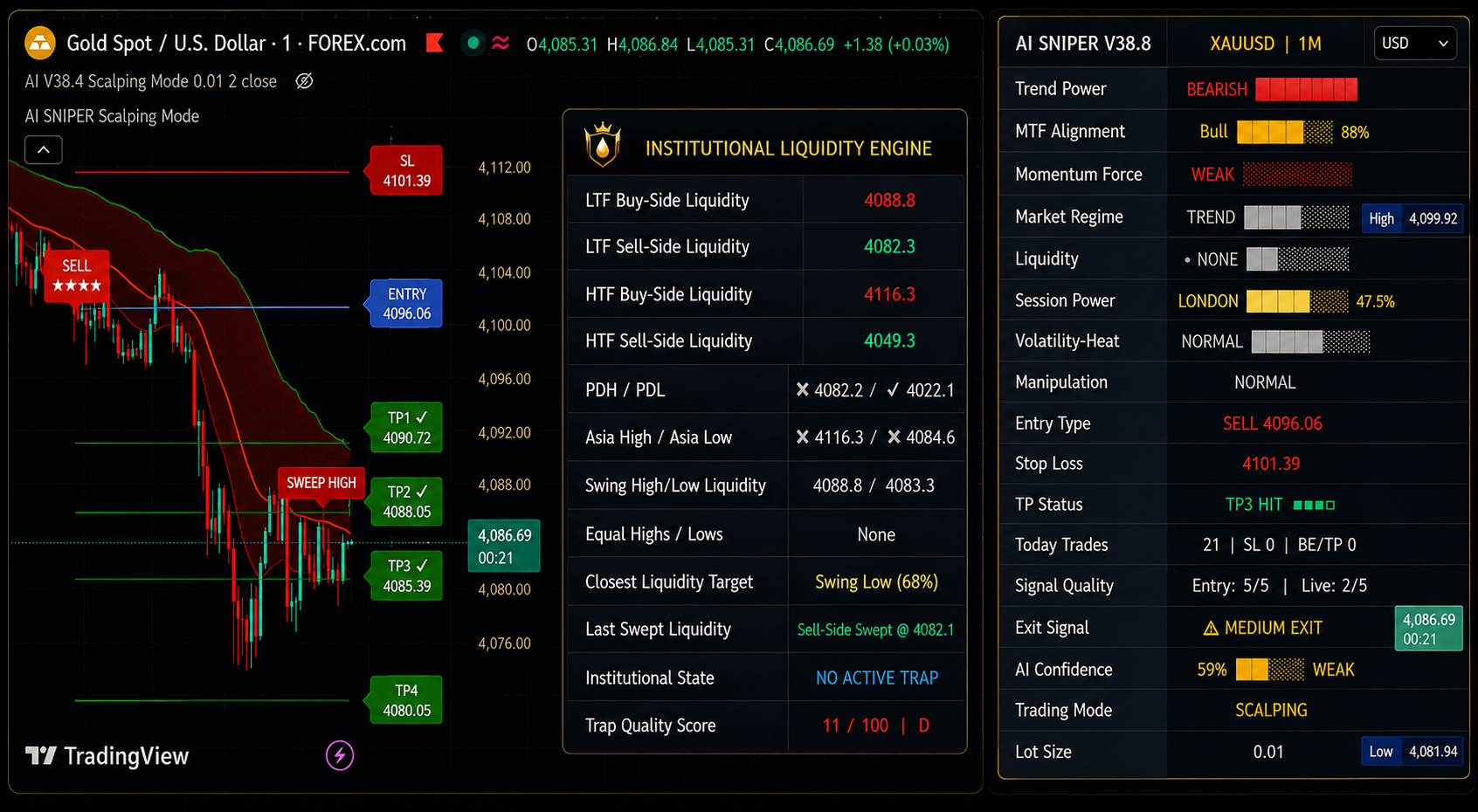
System overview
AI SNIPER™ combines Smart Money Concepts, multi-timeframe context and AI trade analysis into a single chart layout. Instead of switching between tools, you read one dashboard, one set of signals and one exit framework — designed for Gold (XAU/USD) scalping and intraday trading.
Liquidity Institutional Engine
AI SNIPER™ automatically identifies, organizes, and monitors high-value liquidity levels across multiple timeframes. Instead of manually scanning charts for institutional reference points, our engine continuously maps the market's internal structure into one actionable dashboard.
Automatic tracking of HTF & LTF liquidity pools.
Asia High/Low and Previous Day High/Low context.
Real-time mapping of Equal and Swing Highs/Lows.
Instantly identify the closest relevant liquidity to price.
"Spend less time searching for liquidity and more time evaluating the setup."
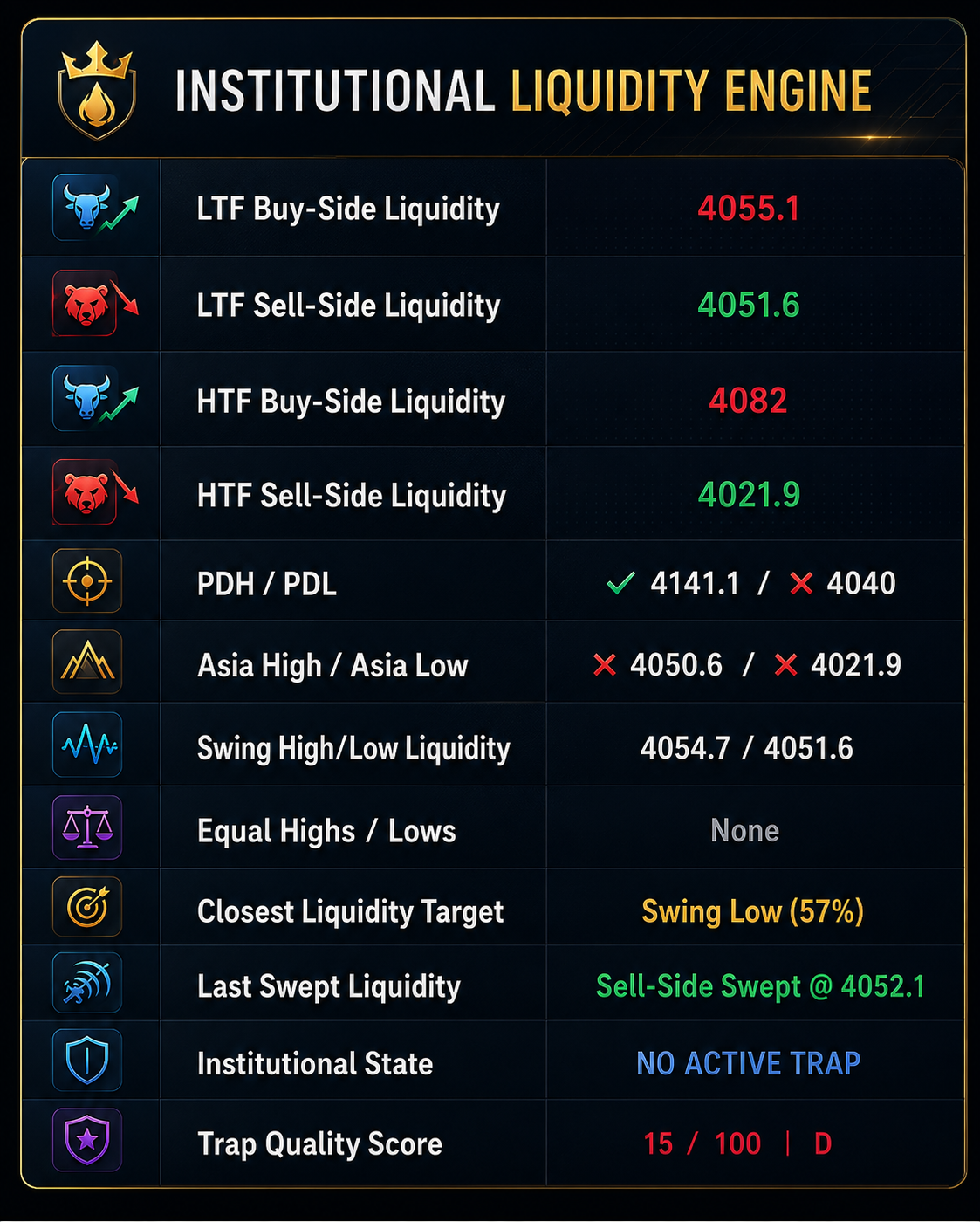
Identifies liquidity references across both high and low timeframes automatically.
Includes Asia High/Low and Previous Day High/Low benchmarks for intraday context.
Organizes Equal High/Low and Swing High/Low liquidity references for better structure clarity.
Distinguishes between remaining relevant liquidity and areas that have already been swept.
Quickly understand which liquidity pool is currently most relevant or closest to the current price.
MULTI-TIMEFRAME INTELLIGENCE
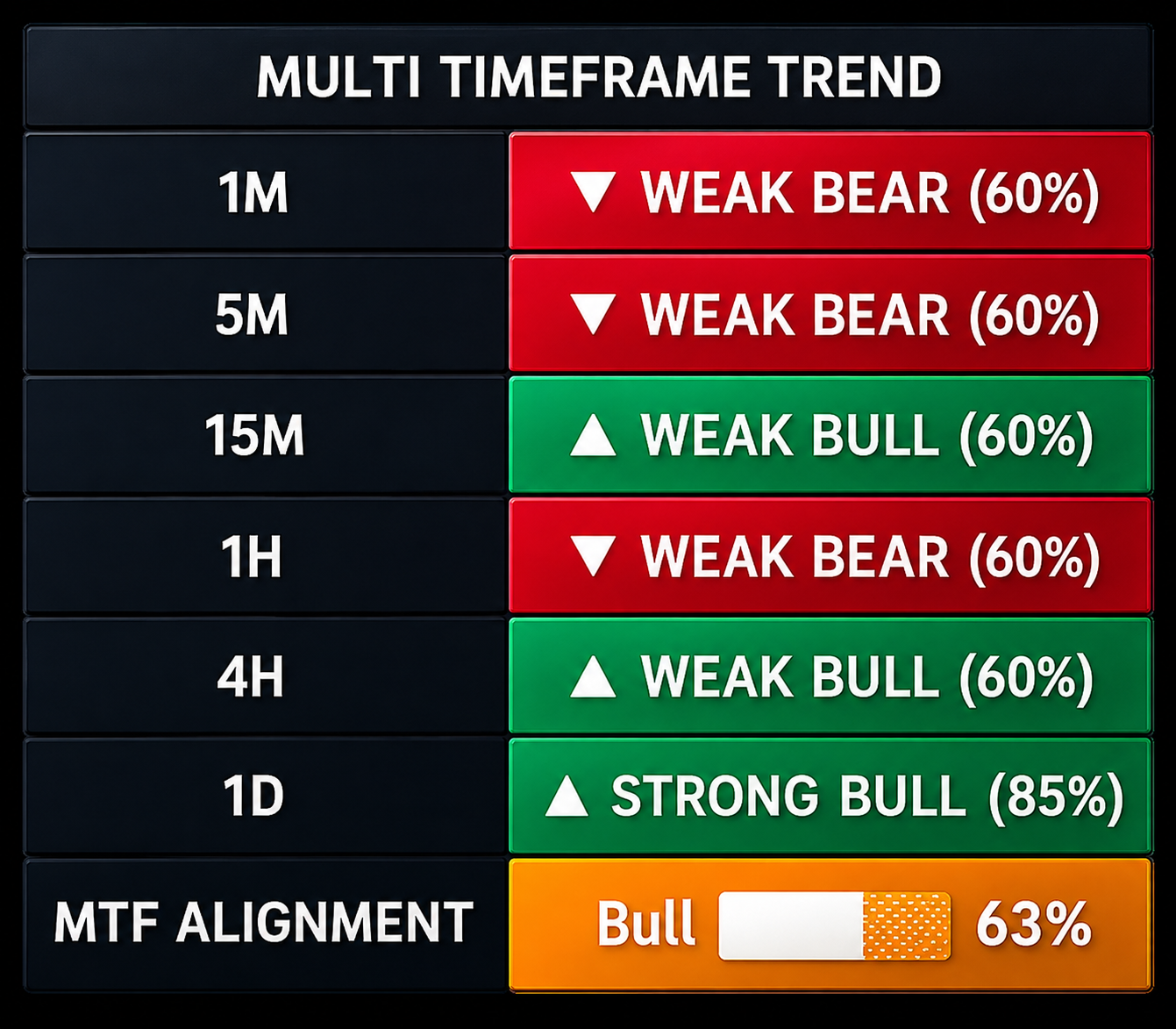
The MTF Dashboard provides a structured view of market direction across multiple timeframes simultaneously. Instead of switching between charts, you read one consolidated panel that reveals whether the higher-timeframe trend supports your lower-timeframe entry.
1M / 5M / 15M alignment for fast execution.
5M / 15M / 1H for standard daily setups.
1H / 4H / 1D to identify institutional direction.
Select and filter only the timeframes relevant to you.
Simultaneous monitoring of 1M through 1D context.
Instantly see if timeframes are in confluence.
Show only the timeframes that match your style.
Weighted assessment of directional strength.
Assess market structure in seconds, not minutes.
Filter out lower-timeframe noise using HTF bias.
Key highlights
AI SNIPER™ Smart Money Trading System replaces a stack of disconnected tools with a single, readable decision surface.
Liquidity, market structure (BOS/CHoCH) and the VAD cloud read institutional behaviour on the chart.
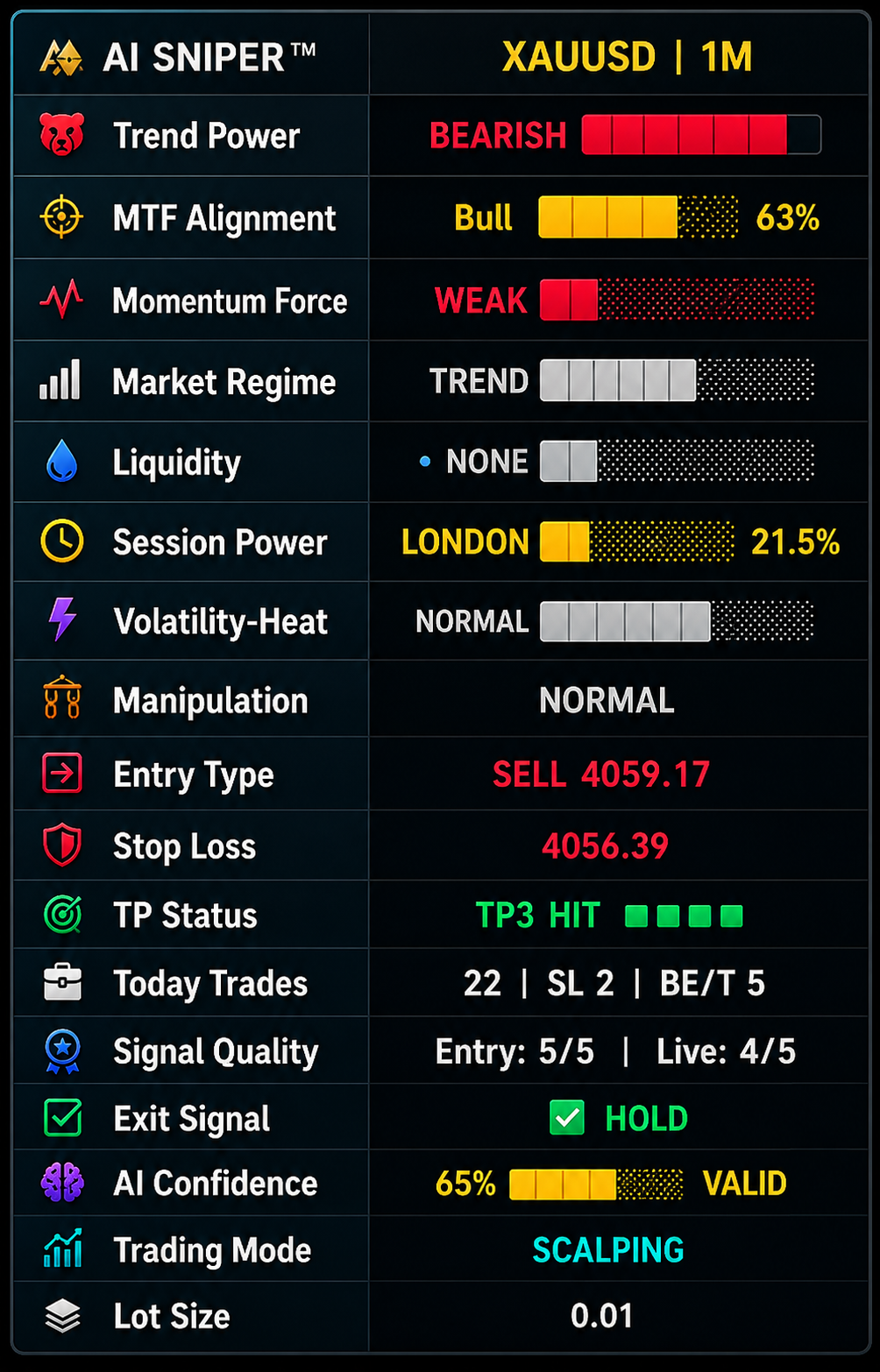
One panel with trend power, AI confidence, signal quality and session context in plain language.
Scalping, Sniper and Ultra Early — match the system to your timing and risk tolerance.
Weak, Medium and Strong exit states help you manage a trade instead of guessing when to close.
Every dashboard row and setting is documented with purpose, meaning and best practice.
Risk-first workflow and documentation. No guaranteed profits, no unrealistic claims.
Why AI SNIPER™
How it works
Structure, liquidity and the VAD cloud establish the current market context.
Entries are filtered by AI confidence, signal quality and your selected mode.
The dashboard keeps momentum, volatility and session strength in view.
Weak, Medium and Strong exit states stage your way out of the position.
Trading modes
Switch modes to change how early and how strictly the system confirms a setup.
Fast reaction for short intraday moves. Best on M1–M5 when volatility is healthy.
Higher confirmation before a signal prints. Fewer entries, cleaner context.
Earliest possible entries at the cost of more noise. Requires strict risk management.
Higher noise: use smaller size and confirm with the dashboard before acting.
Beginner journey
Follow the path in order — each step has its own documentation page.
Install the system on TradingView
Learn the dashboard row by row
Pick a trading mode that fits your style
Read entry signals with confirmation
Use the three-level exit system
Apply consistent risk management
Documentation
The full documentation centre is being published alongside the product launch.
Be up and running in 15–20 minutes.
Every dashboard row, signal and setting.
Workflow, confirmation and session notes.
Answers grouped by product area.
Problem, cause, solution, prevention.
Known errors and how to clear them.
What changed in each version.
Packages
Same system, different commitment. Start monthly, or take lifetime access with all future updates.
New traders getting started
$49per month
Active, regular traders
$99per 3 months
Professional & power users
$300one-time
Payments are currently accepted in crypto (USDT) only. Due to the digital nature of the product, all sales are final once delivered.
FAQ
Our assistant answers are based on approved AI Sniper documentation and knowledge sources. It does not provide financial advice or trading recommendations.
Select a topic to start
Can't find what you need? Open the assistant for a custom query.
Read the documentation first, choose the package that matches how you trade, and keep risk management at the centre of every session.
Questions? Institutional support available at support@aisniperhub.com
Existing buyer? Access the Customer Portal →Market Intelligence
Our research agents are currently scanning global markets for verified gold intelligence.
Ecosystem
Explore our suite of institutional-grade trading and automation tools. AI SNIPER™ and AI SNIPER™ AUTO are available today; agents and marketing automation are next.
Smart Money Trading System
Our flagship Smart Money trading system: an AI dashboard, institutional concepts, three trading modes and a three-level exit system in one workflow.
Autonomous Trading EA
Automate the execution side of your plan with configurable risk rules, session filters and journal-ready logs.
AI-powered autonomous agents
Specialised agents that summarise sessions, review your journal and answer product questions from official documentation. In development.
AI Trading Marketing Command Center
Research the market, create AI-powered trading content, and broadcast it across social media, Telegram, Discord, WhatsApp and trading communities — all from one dashboard.
Stay Ahead of the Gold Market
Get daily Gold market updates, key liquidity levels, important news alerts, morning briefings and market planning — all in one place.